1인 개발 중인 프로젝트에서 Gemini CLI를 사용해보려고 한다.
하는 김에 설치 및 사용방법을 정리해본다.
클로드 코드는 무료 사용 시 사용량 제한이 금방 온다고 들어서 Gemini CLI를 적용해보기로 했다.
1. 파이썬 다운로드
아래 공홈에서 다운로드.
자세한 설치 방법은 구글 검색이나 AI 통해 물어보면 잘 알려준다.
Welcome to Python.org
The official home of the Python Programming Language
www.python.org
2. Node.js 다운로드
아래 공홈에서 다운로드.
https://nodejs.org/ko/download
Node.js — Node.js® 다운로드
Node.js® is a free, open-source, cross-platform JavaScript runtime environment that lets developers create servers, web apps, command line tools and scripts.
nodejs.org
3. gemini-cli 설치
cmd 창에 아래 커맨드를 입력.
npm install -g @google/gemini-cli4. gemini 실행
사용을 원하는 루트로 이동하여
cmd 창에 아래 커맨드를 입력.
gemini
옵션 3개 중 1, 2 중에 고르면 될 것 같다.
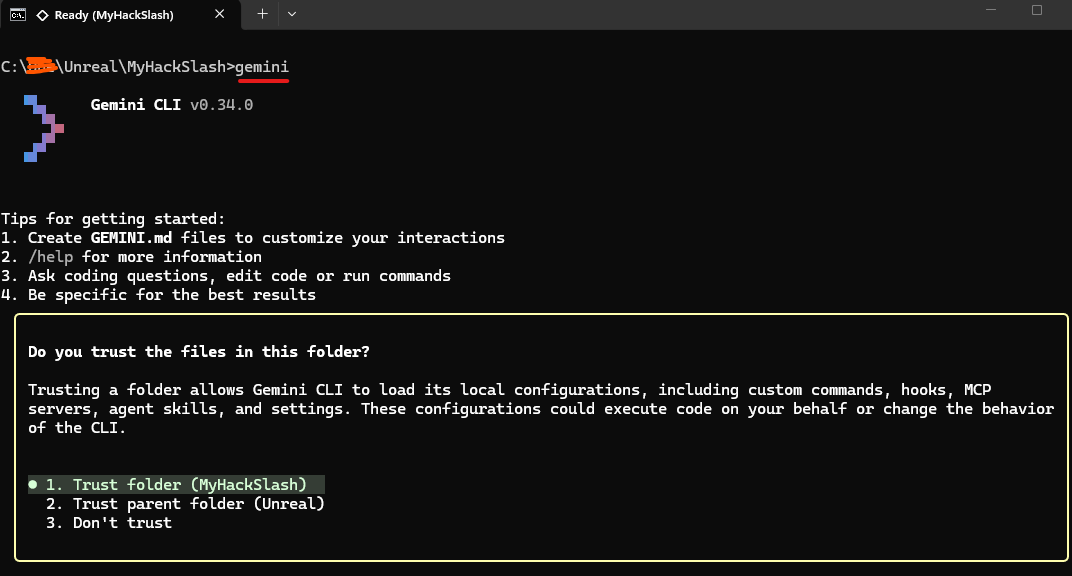
5. 구글 계정 연동
1번을 선택하면 웹사이트에서 구글 로그인을 할 수 있다.

로그인이 완료되면 R을 눌러 재시작해준다.
6. 사용해보기
"내 프로젝트를 분석해서 md 파일을 작성해줘" 라는 명령을 작업 중이던 언리얼엔진 프로젝트 루트폴더에서 내려봤다.
- 아직 플레이어, 몬스터, 공격 기능 뿐인 작은 프로젝트이다.
한 1분쯤 걸려서 아래와 같은 파일을 생성해줬다.
# MyHackSlash

A Top-Down Hack & Slash game built with **Unreal Engine 5.5**.

## Overview
This project implements core hack-and-slash gameplay mechanics, including a combat system powered by the **Gameplay Ability System (GAS)**, AI behavior trees, and an optimized object pooling system.

## Key Features

### ⚔️ Combat System
- **Gameplay Ability System (GAS):**
  - Characters implement `IAbilitySystemInterface`.
  - Abilities (`HGA_Attack`) handle gameplay logic.
  - Attributes and Tags manage state (e.g., cooldowns, damage).
- **Combat Interface:** `HCombatInterface` standardizes damage dealing and receiving.
- **Animation Montages:** Fluid attack sequences and hit reactions.

### 🧠 AI System
- **Behavior Trees:** Modular AI logic with custom tasks, services, and decorators located in `Source/MyHackSlash/AI`.
  - `BTD_AttackInRange`: Checks attack feasibility.
  - `BTS_Detect`: Perception and target acquisition.
  - `BTT_Attack`, `BTT_FindPatrolPos`: Action execution.
- **AI Controller:** Custom `HMonsterAIController` (located in `System`) manages enemy decision-making.

### ⚙️ Systems & Architecture
- **Object Pooling:** `UHObjectPoolManager` (World Subsystem) efficiently manages actor lifecycles to reduce allocation overhead during combat.
- **Enhanced Input:** Modern input handling for player controls.
- **Monster Spawning:** Data-driven spawning system (`HMonsterSpawnerDataAsset`, `HMonsterSpawnManager`).

## Project Structure (`Source/MyHackSlash`)

| Directory | Description |
|-----------|-------------|
| `AI` | Behavior Tree nodes (Decorators, Services, Tasks) and AI interfaces. |
| `DataAsset` | Data definitions for skills and spawning configurations. |
| `GA` | Gameplay Ability implementations (`HGA_Attack`, etc.). |
| `Mode` | Game Mode and Player Controller classes. |
| `Skill` | Combat interfaces and Animation Notifies. |
| `System` | Core subsystems (Object Pooling, Monster Spawning, AI Controller). |
| `Unit` | Character base classes (`HBaseCharacter`), Player, and Monster definitions. |

## Tech Stack
- **Engine:** Unreal Engine 5.5
- **Languages:** C++, Blueprints
- **Plugins/Modules:**
  - GameplayAbilities (GAS)
  - EnhancedInput
  - Niagara
  - AIModule

## Getting Started
1. Clone the repository.
2. Right-click `MyHackSlash.uproject` and select **Generate Visual Studio project files**.
3. Open `MyHackSlash.sln` in Visual Studio.
4. Build the project (Development Editor / Win64).
5. Open `MyHackSlash.uproject` in Unreal Editor.
그리고 앞으로는 한국어로 말하도록 아래와 같이 명령해두었다.
"나에게 설명할 때는 한글로 말해줘. 그리고 평소에 한글로 말하도록 gemini.md에 남겨줘."


GEMINI.md란 Gemini CLI가 읽는 프롬프트 같은 파일이다.
이 파일에 '답변은 항상 유머러스하게 해줘' 등의 상시 적용할 내용을 적어두면 된다.
앞으로 잘 사용해보자!
'Tips' 카테고리의 다른 글
| Suno 곡 길이 연장하기 / Extend 기능으로 곡 길이 늘리기 / Suno 노래 길이 (0) | 2026.04.04 |
|---|---|
| 유튜브 고급 기능 신분증 인증 / 고급 기능 이용 방법 / 주민등록증 인증 (4) | 2024.10.17 |